Case study · Odoo addon · Foresee Solutions
Odoo POS × NetSuite
Every POS order, on NetSuite's books.
An Odoo addon that connects Odoo Point of Sale to NetSuite. Each POS order becomes the right NetSuite documents (invoices, credit memos, customer payments, refunds and gift certificates), posted in the order NetSuite accepts them and never twice. NetSuite stays in charge: it pushes the configuration and the product catalog into Odoo.

NetSuite POS Integration
Point of Sale · Odoo 18
Invoices, returns, payments and gift cards, posted to NetSuite.
depends: point_of_sale · account · loyalty · queue_job
- Role
- Freelancer · end-to-end ownership
- Client
- InnovateNex, for Foresee Solutions
- Timeline
- Jul – Sep 2026 · delivered
- Built on
- Odoo 18 · NetSuite
NetSuite transaction types
Sync states, each with a rule
Automated tests
QA cases signed off
Add-on›Overview
Connecting Odoo POS to NetSuite (GCC Region)
NetSuite is one of the most widely used cloud ERPs, but its own point of sale is only offered in the US, Canada, Australia, England and New Zealand. It isn't available in the GCC. Retailers in the region who run their business on NetSuite have two options: build a POS themselves, or pair NetSuite with a third-party one. Odoo POS is a popular choice because it's fast to set up and easy for cashiers to learn.
That leaves two systems that don't talk to each other. Sales are rung up in Odoo, while the books, stock and reporting live in NetSuite. Someone has to move every sale, return and payment across by hand, and reconcile the gaps when they don't match.
My job was to connect them. I built an Odoo add-on that sends every POS transaction to NetSuite automatically and correctly. It runs inside Odoo and talks to NetSuite directly, so there's no middleware platform to license or maintain.
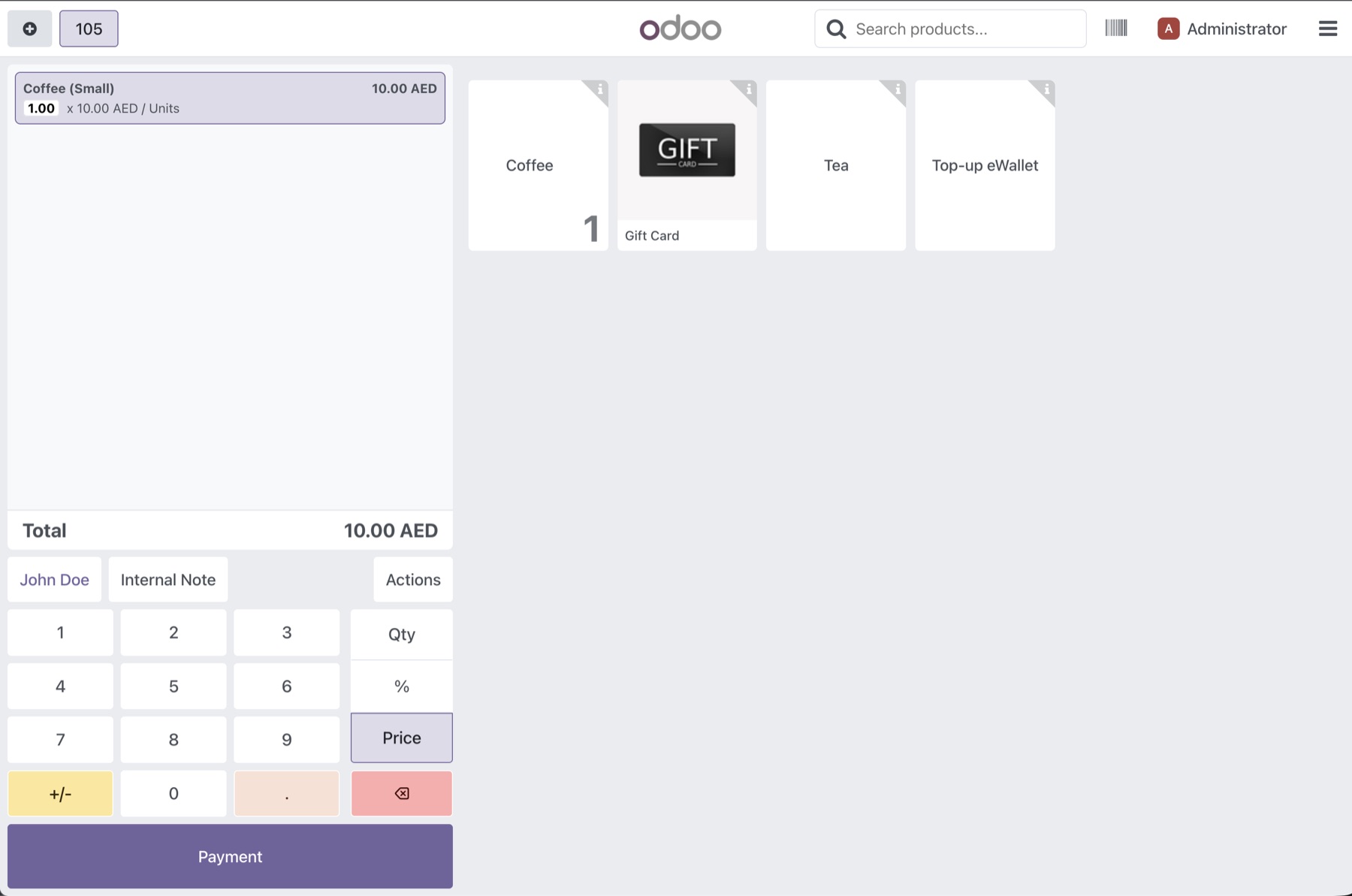
Each product on the order becomes a line on a NetSuite document, matched by its NetSuite item ID. Products are created in NetSuite and pushed into Odoo, so every item already has one.
- Line → NetSuite item + tax code
- Payment
Add-on›Architecture
Connecting Odoo-POS to NetSuite
Odoo 18
Point of Sale
- pos.order
- pos.payment · tenders
- account.move · invoices, credit notes
- loyalty.history · gift cards
The add-on
netsuite_pos_integration
- /api/netsuite/* controllers
- invoice · credit note · payment sync
- queue_job · root.netsuite
- mappings · sync log
NetSuite
RESTlets & SuiteQL
- invoice · credit memo · payment RESTlets
- payment method list
- SuiteQL · subsidiaries, locations
- configuration record · products
The add-on runs inside Odoo and calls NetSuite directly. NetSuite owns the configuration and product catalogue and sends both to Odoo. Odoo owns the POS transactions and sends those to NetSuite. Outgoing requests are signed with OAuth 1.0a; incoming requests are authenticated with an Odoo API key.
Add-on›Configuration
Managed via NetSuite
NetSuite is where the finance, management and ops teams work and use it for their daily operations and analysis, so that's where the integration is configured. NetSuite sends the credentials, sync mode, merge rules, retry policy and concurrency limit to Odoo, where they're stored read-only. There's one source of settings, so the two systems can't drift apart.
POST /api/netsuite/config/update
{ "configuration": {"integration_mode": "realtime""consolidate_invoices": false"consolidate_payments": false"max_concurrent_jobs": 3"log_retention_days": 90} }A single, protected configuration. Saving the configuration in NetSuite sends it to Odoo. Odoo accepts only one configuration record; an attempt to delete it is blocked and logged.
- Each invoice and payment is queued the moment it's created and sent individually.
- Real-time can't be combined with merged invoices; the add-on rejects that setting when it arrives.
queue_job.channels = root.netsuite:3
Within NetSuite's limits. NetSuite limits how many requests an integration can make at once. The add-on reads that limit (1–4) from the configuration and sizes its job queue to match.
Add-on›Master Data Mappings
Mapping warehouses, payment methods and taxes
Most POS customers are anonymous, so a customer record can't tell NetSuite which branch a sale belongs to. The counter can. The add-on traces each order back to its shop's warehouse and maps that to a NetSuite subsidiary, department and location. Payment methods and taxes are mapped the same way.
POS counter
Counter 1
Operation type
Shop A: PoS Orders
Warehouse
Shop A
Warehouse
→ Subsidiary · Department · Location
POS payment method · Cash
→ NetSuite payment method (fetched live)
Sale tax · VAT 5%
→ NetSuite tax code
Turn a mapping off to see what happens.
{
  "shop": "Shop A",
  "subsidiary_id": "3",
  "department_id": "12",
  "location_id": "14",
  "lines": [{ "item_id": "456", "tax_code_id": "-8" }]
}
Subsidiaries, departments and locations are loaded live from NetSuite, so nobody copies IDs by hand. Each warehouse can be mapped only once.
Add-on›Invoices & Payments
Invoice and payment sync
Every invoice raised at the counter and every payment taken against it is sent to NetSuite. Invoices can go one at a time as they happen, or merged per shop at the end of the day. Payments are applied to the right invoice, net of any change handed back.
NetSuite invoice
Consolidated 6 invoices (Shop A)
NetSuite invoice
Consolidated 4 invoices (Shop B)
Daily merge per shop
In scheduled mode, each shop's invoices for the day become one NetSuite invoice, with lines merged by item and tax. Its payments become one customer payment per payment method, settling all of that day's invoices at once. Different shops and days are never combined.
Change handled correctly
Odoo records change given back as a separate negative line. The add-on combines them per order and payment method, so NetSuite receives what the customer actually paid.
Payments wait for their invoice
If an invoice hasn't reached NetSuite yet, its payment checks again every 30 seconds for up to 30 minutes, without using up its retries.
Add-on›Returns & Exchanges
Handling returns and exchanges
A return becomes a NetSuite credit memo. An exchange is harder: one order that returns one item and sells another. Scroll through a real exchange from testing to see how the add-on turns it into three linked NetSuite documents.
Shop A/0003 REFUND
Tea (Small)
1.00 × 6.00
Coffee (Small)
-1.00 × 10.00
01 / 06 · The order
A customer returns a Coffee (−10.00) and takes a Tea (+6.00) in one order, and receives 4.00 back on their card.
Add-on›Gift Cards
Gift card and eWallet support
Customers can buy a gift card or top up an eWallet at the counter, then spend either one as payment later. The add-on carries all of it to NetSuite. Purchases and top-ups become NetSuite gift certificates, with the sender and recipient details attached, and every redemption is drawn from the right certificate when its invoice is posted. eWallets follow the same path, because NetSuite has no wallet record of its own.
Two NetSuite limits made this harder. Odoo gift card codes are 14 characters, but NetSuite allows 9, and a NetSuite certificate can't be topped up. So each purchase or top-up becomes its own certificate, with a code generated from the card number.
Enter any card code. It runs the add-on's own algorithm in your browser. The same card and top-up always give the same code, so no lookup table is needed.
NetSuite gift certificate
Purchase 200
Oldest balance first
When a card is used, the add-on replays its history and spends the oldest certificate first, telling NetSuite exactly how much comes from each.
Top-ups before spending
When a day is merged, gift card sales go first on their own invoice, so a certificate exists before anything in the same batch uses it.
Add-on›Sync Order
Sync order, retries and duplicate protection
NetSuite rejects a payment whose invoice doesn't exist yet, and a refund whose credit memo is missing. It also won't stop the same document from being sent twice. I built the sync so that ordering and duplicates are handled by the add-on, not left to timing.
step 1
Invoices
step 2
Payments
step 3
Credit notes
step 4
Refunds
A fixed sync order
Invoices, then payments, then credit notes, then refunds. Credit notes come after payments so a credit can't absorb the balance a payment was meant to settle. If the invoice step fails, nothing after it runs.
A: SELECT … FOR UPDATE NOWAIT
No duplicate processing
Each record is locked while it's being sent. A second job that tries to send it at the same moment steps back, checks again, and finds it's already done.
retry 0/3 · backoff 2^n min
Failures are never lost
If a sync fails, the job's changes roll back but the failed status and its reason are still saved, so support always knows what went wrong.
Add-on›Sync Logs
Monitoring, sync status and audit logs
Replacing manual reconciliation only works if people can trust what the integration did. Every record carries a sync status with a clear rule behind it, and every order shows exactly what it created in NetSuite. Hover over a status to see when it applies, then look at the screens the client's team uses day to day.
synced · Accepted by NetSuite, with its IDs saved back on the record.
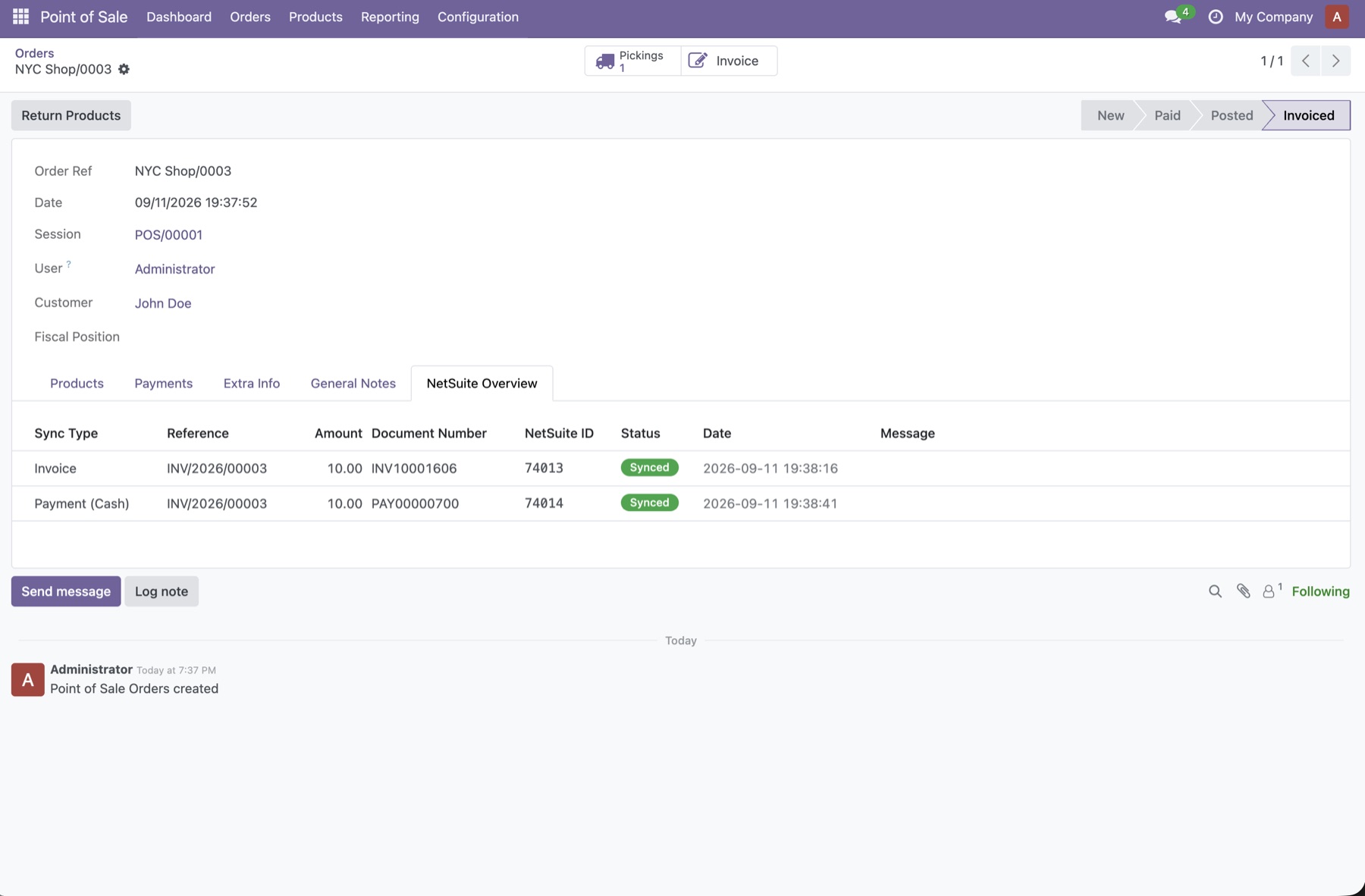
A standard sale. The invoice and its cash payment are listed with their NetSuite document numbers and IDs.
What I owned
My role: end-to-end ownership
InnovateNex brought me in as a freelancer to connect Odoo POS to NetSuite for their client, Foresee Solutions. I owned the whole of it: the architecture, the NetSuite integration, the business rules, the back-office experience, and delivery.
Designed how every POS transaction reaches NetSuite.
- Routed documents by warehouse rather than customer, since POS customers are usually anonymous.
- Used individual POS payments as the source for NetSuite payments, instead of end-of-session totals.
- Built one ordered sync that stops as soon as a step fails.
Log notes
Key decisions and known limitations
Mustafa Patharia · Design decision
Branch comes from the warehouse.
POS customers are usually anonymous, so subsidiary, department and location come from the counter's warehouse.
Mustafa Patharia · Design decision
Real-time means one record at a time.
Merging needs a full day of sales, so it only happens in the scheduled run.
Mustafa Patharia · Design decision
Every NetSuite ID is saved immediately.
A retry continues where it stopped instead of creating duplicates.
Mustafa Patharia · Design decision
Products are pushed from NetSuite.
NetSuite maintains the catalogue and sends each change, so the add-on never polls for updates.
Mustafa Patharia · Known limitation
One Odoo card, several NetSuite certificates.
NetSuite can't top up a certificate, so each load gets its own. The full Odoo card code stays on the invoice line for reconciliation.
Mustafa Patharia · Known limitation
Refunded gift card balances aren't sent back.
Refunding a gift card doesn't change certificates already in NetSuite. If that balance is later spent, the sync stops with a clear error instead of posting a wrong amount.
Mustafa Patharia · Known limitation
At most four jobs at once.
NetSuite limits concurrent requests, so the queue never runs more than four jobs in parallel.
Stack